Linking Related Form CSV Exports to GIS Features
Related Forms are intentionally more flexible than a standard shapefile attribute table. One feature can have many related entries, and a single layer can have several different related form types. Most GIS exchange formats do not represent that kind of many-to-one form history natively, so GoGIS exports those records in parallel CSV files.
The key is the GoGIS_ID column. The main exported layer includes a stable GoGIS_ID value for each feature. Each Related Form CSV includes the same GoGIS_ID, so you can join, relate, filter, or import those records back into a GIS or database.
What the Export Contains
When you export a layer that has Related Forms, the ZIP can include:
- The main GIS layer in the format you chose, such as Shapefile, GeoJSON, GeoPackage, KML, or CSV.
- One CSV per Related Form containing entries for that form type.
- Media folders for photos, sketches, and signatures associated with related entries.
- Related form metadata so the form definitions and entry structure can be understood during reimport or downstream processing.
The Join Column: GoGIS_ID
GoGIS_ID is the bridge between the parent feature and the related records. If a meter feature has GoGIS_ID = 60083, then every meter reading, inspection, or maintenance log for that meter includes the same value.
That gives you a clean relationship:
- Main layer: one row per GIS feature.
- Related Form CSV: many rows per GIS feature.
- Relationship: main layer
GoGIS_IDequals related CSVGoGIS_ID.
Example: Meter Readings
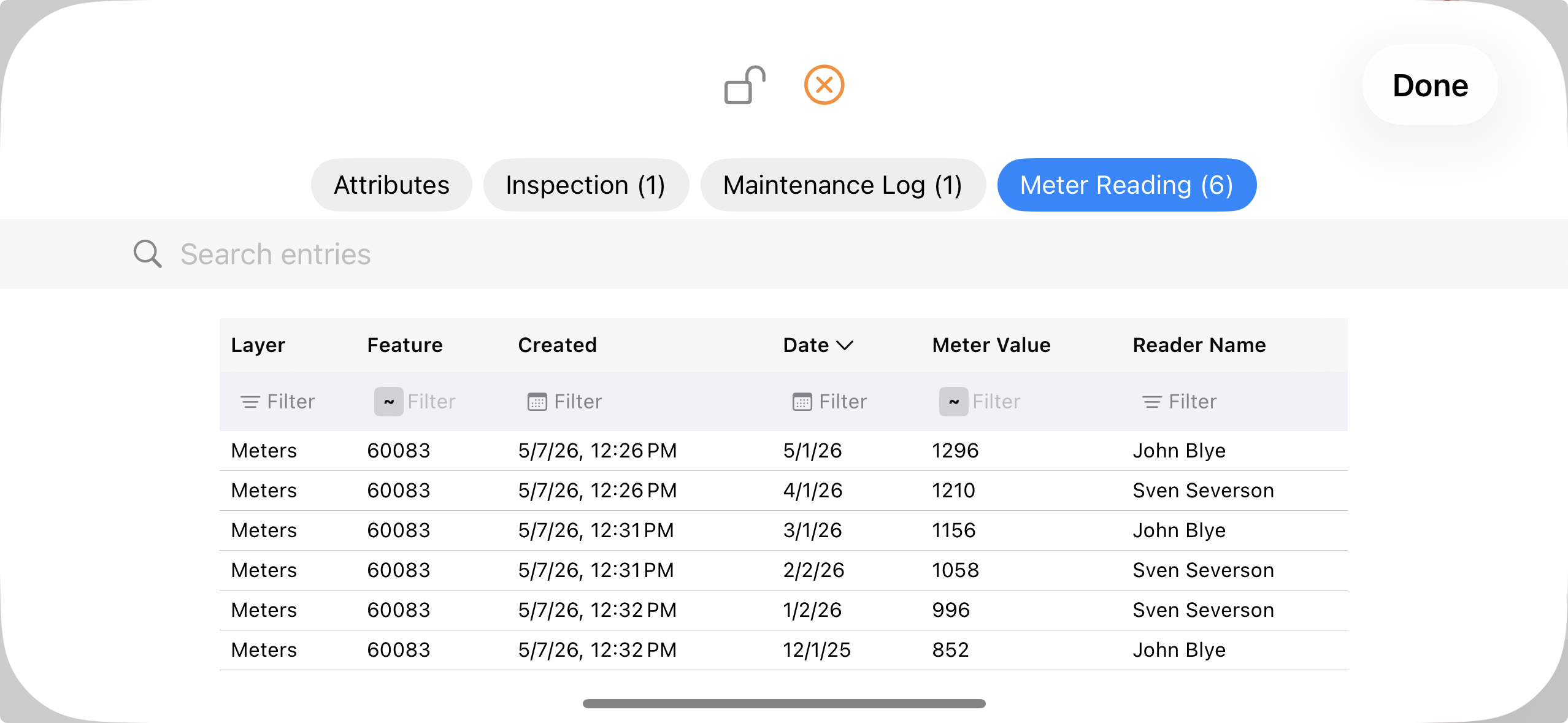
A meter layer might export one feature row for meter 60083. The Meter Reading related CSV can contain six rows for that same feature: December, January, February, March, April, and May readings. Each row has its own date, meter value, reader name, created timestamp, and any additional fields you defined.
This preserves the history without flattening it into awkward columns like Reading_1, Reading_2, or Reading_3. It also means new readings do not require changing the schema of the main GIS layer.
How to Use the CSVs
- In spreadsheets: filter the related CSV by
GoGIS_IDor summarize readings by asset. - In desktop GIS: load the main GIS layer and the related CSV, then create a relationship or join using
GoGIS_ID. - In databases: import the main layer as the parent table and each related CSV as a child table keyed by
GoGIS_ID. - For reimport: use the related form metadata to rebuild form definitions and reload entries with their original parent feature links.
Why Not Put Everything in the Shapefile?
Shapefiles and many simple GIS formats are built around one feature row with one set of attributes. Related Forms are different: they can contain multiple rows for the same feature and multiple form types per layer. Exporting those entries as CSV keeps the data faithful to how it was collected.
The result is simpler and safer: your main spatial layer remains compatible with normal GIS tools, and the repeated records remain clean tabular data that can be joined back whenever needed.
New to Related Forms?
Start with the overview guide to see the field workflow before digging into export details.
Read the Related Forms Guide