Dutch Cadastre & Crop Parcels on Your iPhone & iPad
The Netherlands publishes its land registry and its farm map openly, through PDOK. The BRK cadastral map has every parcel in the country, with its cadastral municipality, section and number. The Basisregistratie Gewaspercelen (BRP) has every field farmers declared to RVO, with the crop grown on it, down to the tulips and lilies.
GoGIS now has a Netherlands section in Reference Data. Move the map to your area, pick a dataset, and the parcels download as a layer on your iPhone or iPad, with every code written out and the crops colored by group.
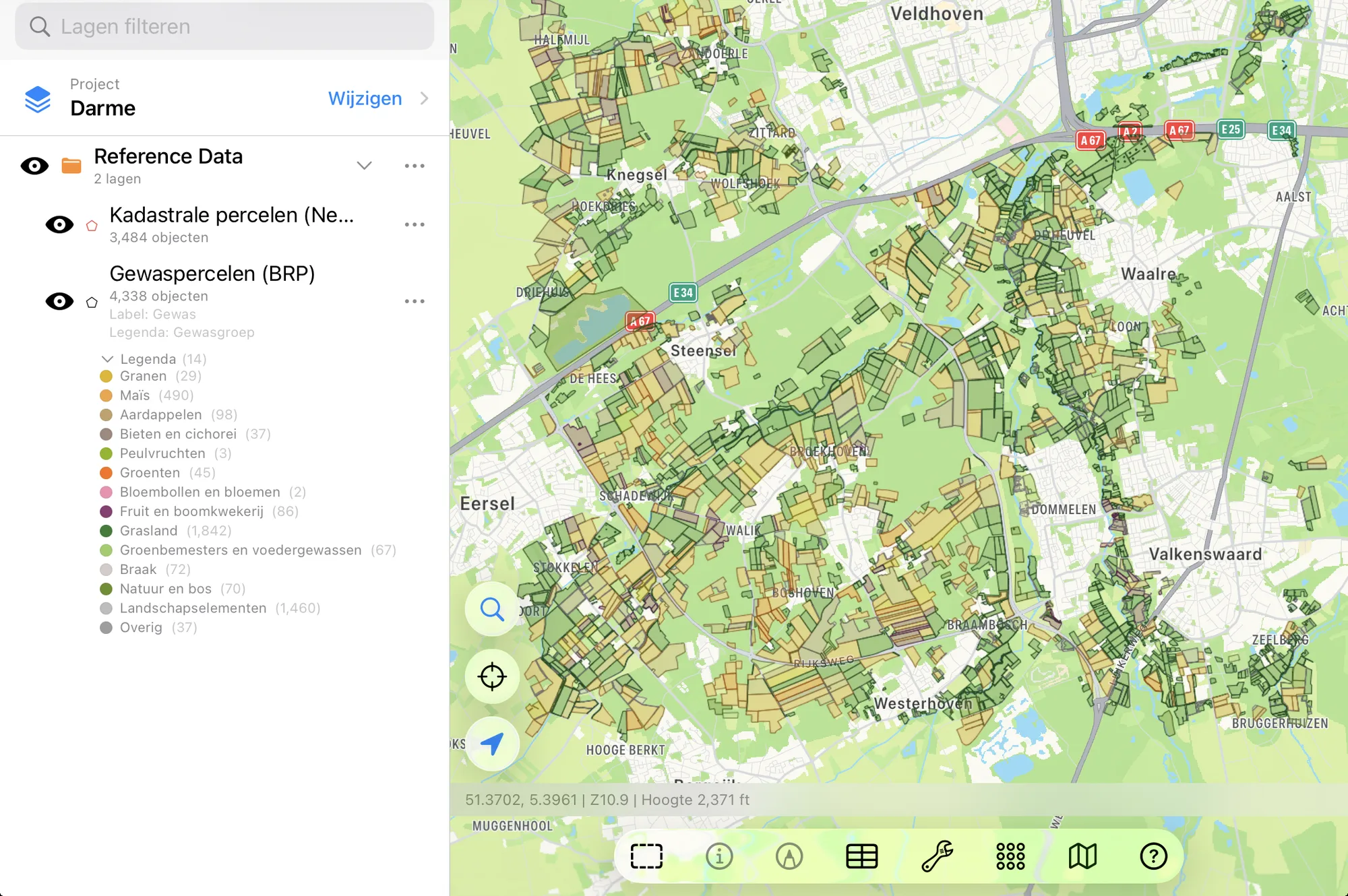
The Dutch Datasets
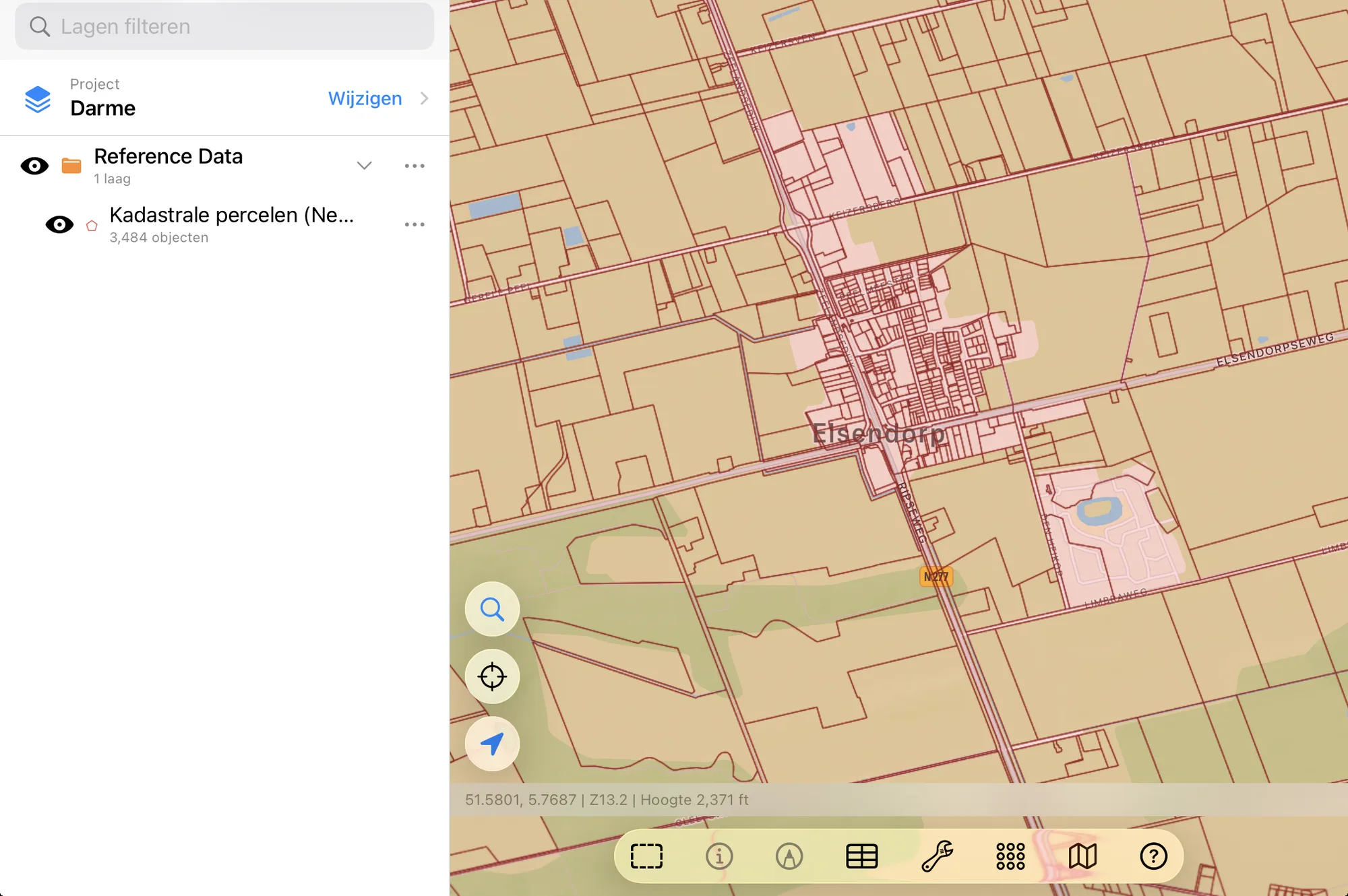
- Netherlands Cadastral Parcels — the Kadaster's cadastral map (Kadastrale kaart) from the BRK, the Basisregistratie Kadaster: all the country's cadastral parcels (kadastrale percelen). Each parcel is written as section and number (I 447), with its cadastral municipality, its cadastral designation (DTN01 I 447), its area in the register in hectares, whether that area has been surveyed, and its parcel ID. Parcels are small, so zoom in to a village or a few farms before you download. Kadaster / PDOK – BRK Kadastrale kaart. CC BY 4.0.
- Netherlands Crop Parcels (BRP) — the parcels farmers declared to RVO for the latest final year, with the crop, a crop group, RVO's category, the parcel's mapped area, the year, its status and the crop code (gewascode). The ditches, hedges and other landscape elements farmers declare beside their fields are kept too, in light grey. The layer arrives colored by crop group, and you can download a wider area than the cadastre. RVO / PDOK – Basisregistratie Gewaspercelen (BRP). Public domain.
- Netherlands (PDOK BGT) — road sections (wegdelen) from the large-scale topography, the Basisregistratie Grootschalige Topografie, for a street or two at a time. Kadaster / PDOK, Basisregistratie Grootschalige Topografie.
In English or in Dutch
This is Dutch data, so GoGIS speaks Dutch when you do. With the app set to Dutch, the columns are Perceel, Kadastrale gemeente, Oppervlakte (ha), Gewas, Gewasgroep, and the crops keep RVO's own names: Tarwe, winter-, Aardappelen, zetmeel, Tulp, bloembollen en -knollen. In any other language you get English throughout: Parcel, Cadastral Municipality, Crop, Crop Group, and Winter wheat, Starch potatoes, Tulip bulbs.
The columns, the values and the legend all change together, so a printed map or an exported shapefile reads in one language from end to end. The crop code stays in its own column, so you can always match a parcel back to RVO's list.
The Crop Groups
RVO's own categories (arable land, grassland, nature) are too broad to color a farm map by, so the legend uses fifteen crop groups, colored roughly as the crops look from the air, with flower bulbs in a group of their own. Tap a parcel for its exact crop, or change the legend to color by crop or category.
| Crop group | In Dutch |
|---|---|
| Cereals | Granen |
| Corn | Maïs |
| Potatoes | Aardappelen |
| Beets and chicory | Bieten en cichorei |
| Pulses | Peulvruchten |
| Oil and fiber crops | Olie- en vezelgewassen |
| Vegetables | Groenten |
| Flower bulbs and flowers | Bloembollen en bloemen |
| Fruit and nursery | Fruit en boomkwekerij |
| Grassland | Grasland |
| Green manure and forage | Groenbemesters en voedergewassen |
| Fallow | Braak |
| Nature and woodland | Natuur en bos |
| Landscape elements | Landschapselementen |
| Other | Overig |
How to Download the Parcels
- Move the map to your area. Search for a town or an address, or pan and zoom to the fields you want. GoGIS downloads what's on the screen.
- Open Reference Data. Tap Import, then Reference Data. The row of countries along the top opens on the one the map is showing, so with the map in the Netherlands, the Netherlands datasets are the ones listed. Tap another country, or Global for worldwide data such as OpenStreetMap.
- Choose a dataset. The download keeps going if you switch apps or the screen would otherwise lock, and progress shows on the map. If an area holds a great many parcels, GoGIS tells you how many and asks before it downloads them.
- Read the map. The crop parcels arrive colored by crop group and labeled by crop; the cadastre arrives labeled by parcel. Tap any parcel to see everything about it.
Put the Parcels to Work
- Find a parcel on the ground. Walk to it with your GPS position on the map and the parcel numbers on screen, with or without signal once the layer is downloaded.
- See what's grown around you. The crop parcels show the whole landscape at a glance: where the potatoes, beets, corn, grassland and bulbs are.
- Combine them with your own data. Open your field boundaries or sample points over them, or use Intersect to cut the crop parcels by the cadastre and see which crops sit on which parcels.
- Export or print. Share either layer as a Shapefile, GeoPackage, KML, GeoJSON or CSV, or print a PDF map. The source credit goes on the print and with the export.
Elsewhere in Europe? Reference Data also has the German cadastre and crop fields, Swedish crop fields and soil maps, the French cadastre and crop parcels, and OpenStreetMap roads, rivers, buildings and land use anywhere.
Questions
Which year are the crop parcels?
The latest year RVO has made final, which in late 2026 is 2025. The provisional parcels of the current year change while farmers amend their applications, so GoGIS shows the final ones.
Why is the crop parcel area "mapped"?
RVO doesn't publish an area with the BRP, so GoGIS measures each parcel's outline. The cadastre's area, by contrast, is the one in the land register.
Do I need desktop GIS software or an account?
No. GoGIS downloads the parcels straight from PDOK. There's no key, no account and nothing to unzip.
Dutch parcels, in your pocket
The Kadaster's parcels and RVO's crop parcels, in English or Dutch, ready to download on your iPhone or iPad.
Get GoGIS on the App Store