OpenStreetMap Data on Your iPhone & iPad
OpenStreetMap is the most complete free map of the world, built by millions of volunteers. It has nearly every road and track, river and ditch, building outline and patch of farmland or forest. But getting it out as GIS data usually means a desktop program, an Overpass query or a country-sized download that you then have to cut down to the few square kilometres you need.
GoGIS now has OpenStreetMap in Reference Data. Move the map to your area, choose a layer, and OpenStreetMap's features download onto your iPhone or iPad as a real GIS layer: every road or building is a feature you can tap, edit, style, measure and export.
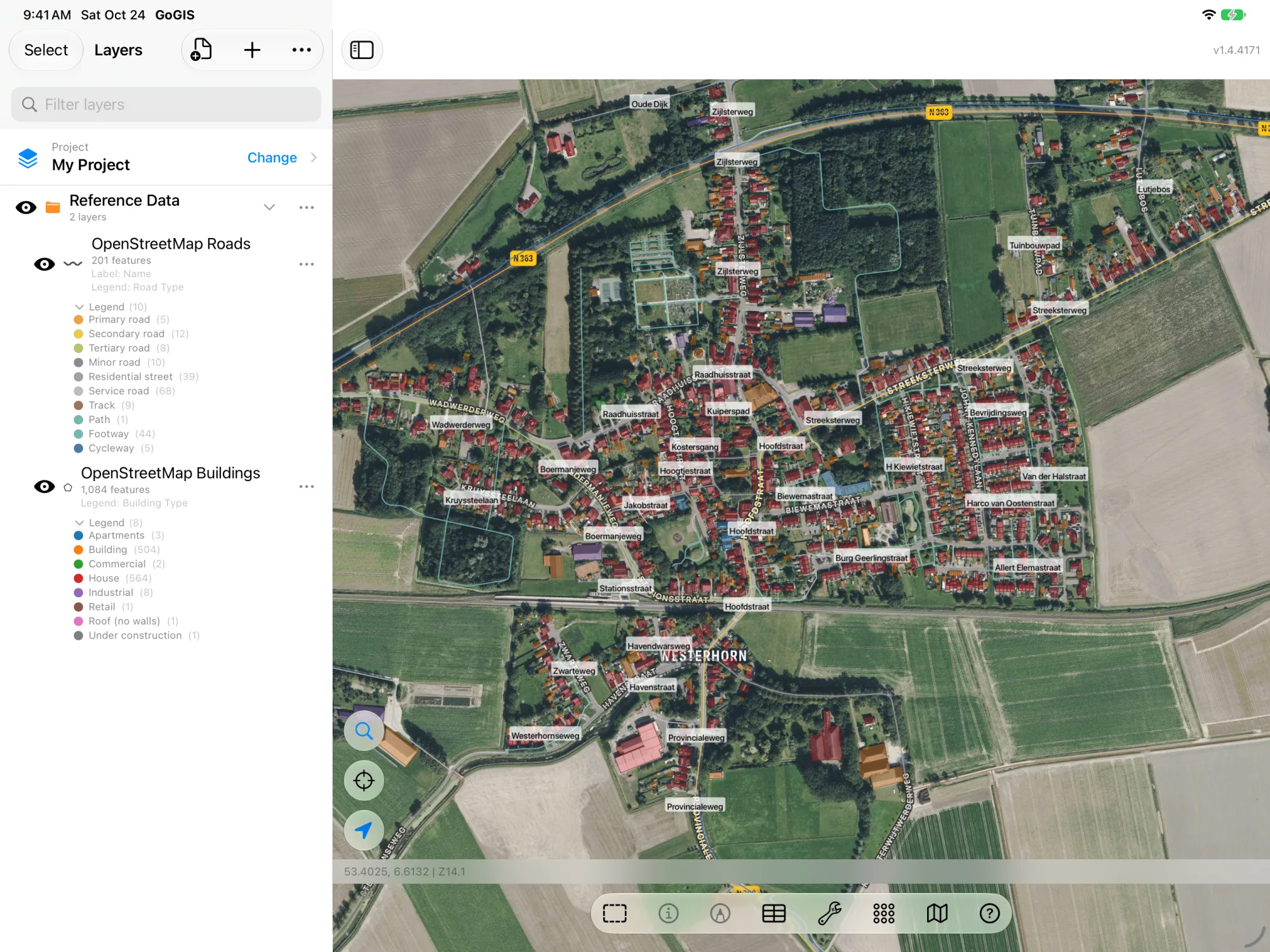
Four OpenStreetMap Layers
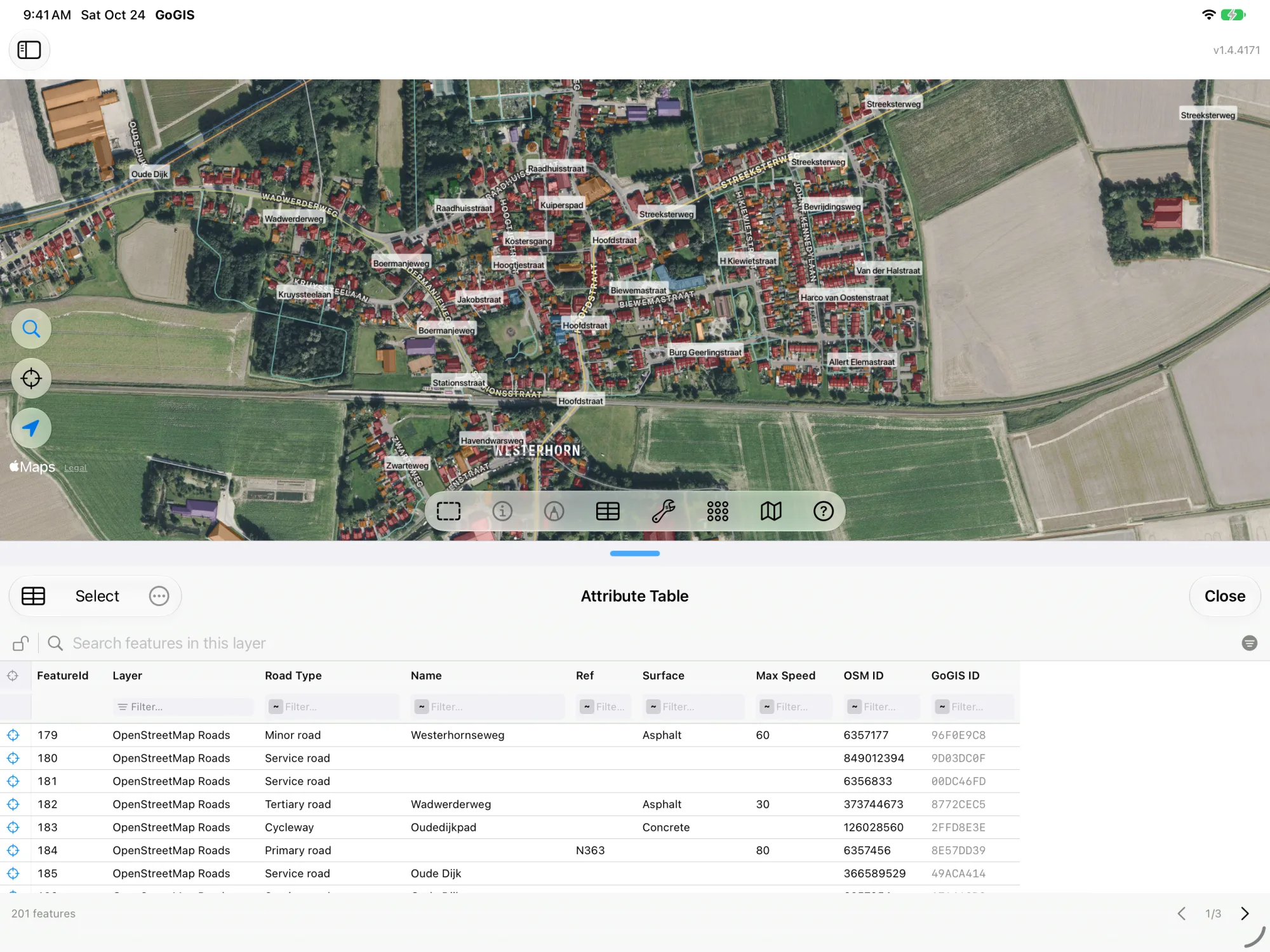
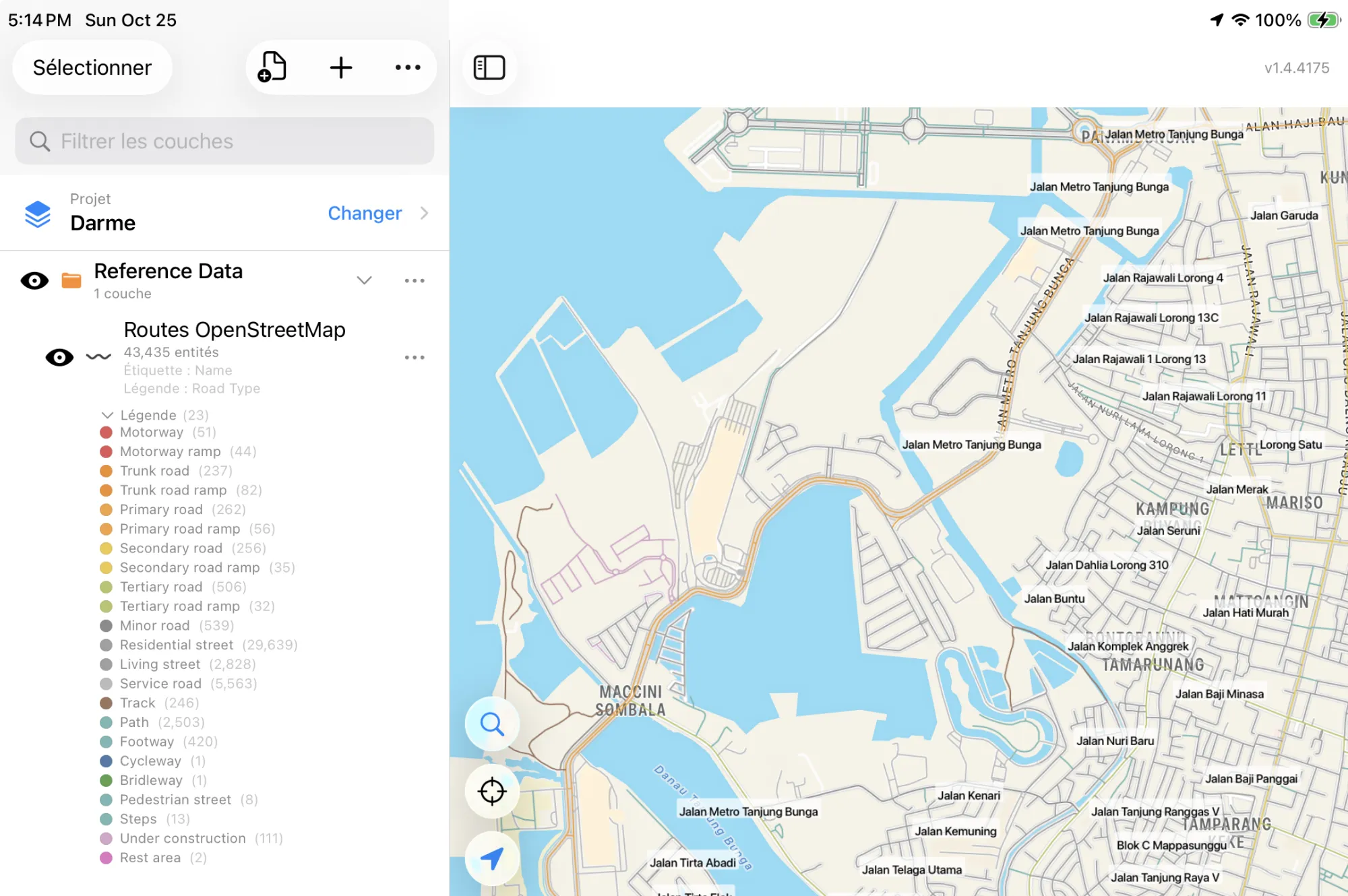
- OpenStreetMap Roads — motorways down to farm tracks, footpaths and cycleways, colored by road type. Columns: Road Type, Name, Ref (the road number), Surface, Max Speed and OSM ID. Zoom in close before you download.
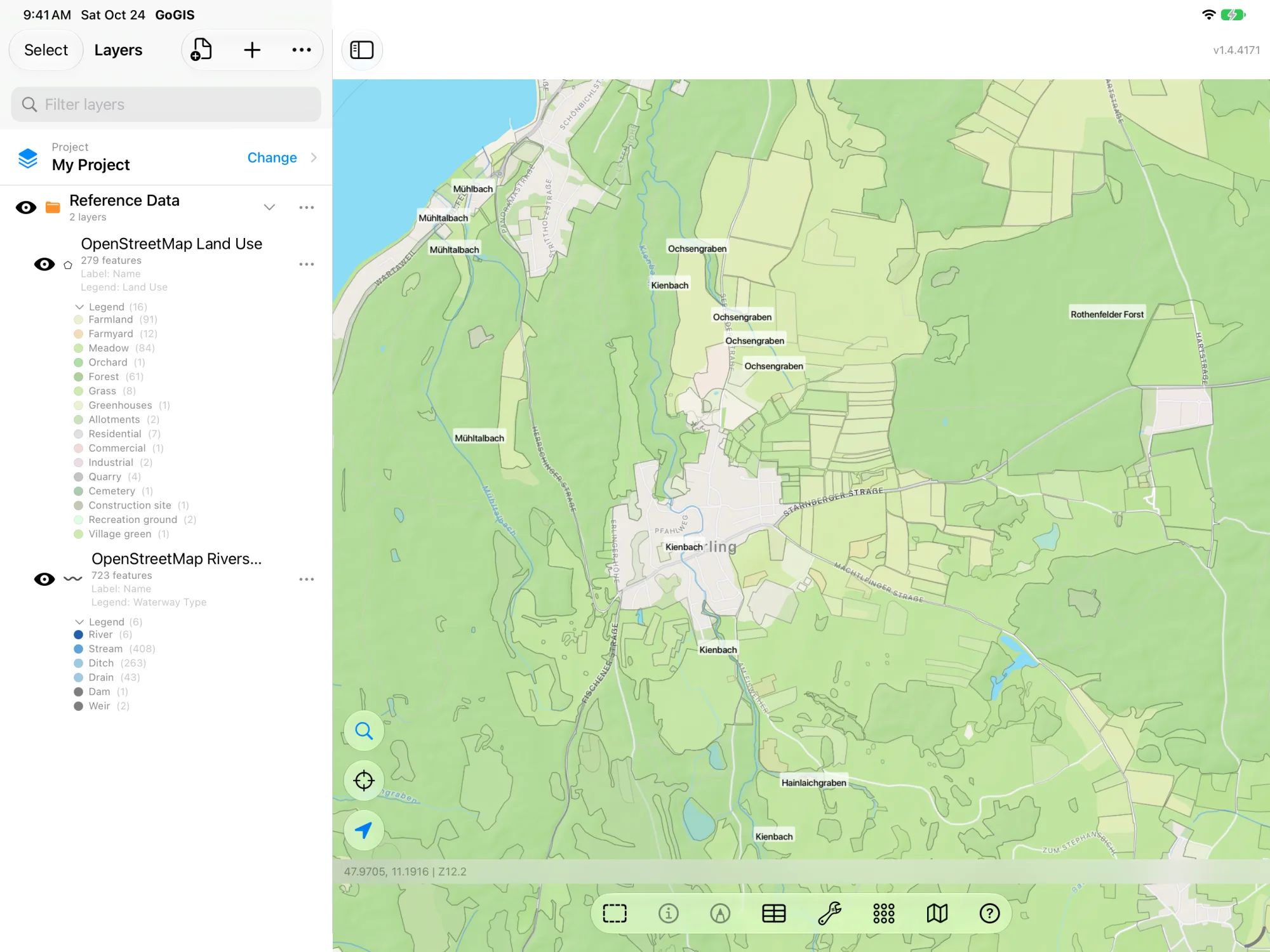
- OpenStreetMap Rivers & Streams — rivers, streams, canals, ditches and drains, plus dams and weirs. Columns: Waterway Type, Name, Intermittent and OSM ID. Useful for setbacks around water.
- OpenStreetMap Buildings — building outlines with their type: house, barn, farm building, shed, silo, greenhouse, warehouse, school, church and more. Columns: Building Type, Name, Levels, Address and OSM ID. Zoom in very close; towns have a lot of buildings.
- OpenStreetMap Land Use — farmland, meadow, orchard, vineyard, forest, residential, commercial, industrial, quarry and other land-use areas. Columns: Land Use, Name and OSM ID.
OpenStreetMap stores its types as tags such as highway=track or building=farm_auxiliary. GoGIS writes them out as plain words, “Track” and “Farm building”, and gives each layer a ready-made legend. The OSM ID is kept, so you can always find the feature on openstreetmap.org.
How to Download OpenStreetMap Data
- Move the map to your area. Search for an address or place, or pan and zoom. GoGIS downloads what's on the screen.
- Open Reference Data. Tap Import, then Reference Data, and find the OpenStreetMap layers.
- Pick a layer. Roads, Rivers & Streams, Buildings or Land Use. GoGIS works out which part of the world you're in and fetches from the right regional copy. If the area holds a great many features, it tells you how many and asks before it downloads them.
- Use it. Tap a feature to see its columns, open the attribute table to sort and filter, or change the legend.
What You Can Do With It
- Export OpenStreetMap to Shapefile, GeoPackage, KML or GeoJSON. Download the layer, then export it in the format your other software wants. It's the quickest way we know to get a clean shapefile of one area's roads or buildings.
- Edit it. The layer is yours. Delete what you don't need, reshape a track the way it really runs, add the farm buildings that aren't mapped yet, or add your own columns.
- Measure setbacks. Buffer the streams or roads by a distance, then subtract the buffer from a field with Difference to see the area that's left.
- Give your own data context. Put your sample points, parcels or inspection sites on top of the roads and buildings around them, and take the map into the field offline.
- Print a map. Make a PDF map with your layers and the OpenStreetMap credit printed in the corner.
Where the Data Comes From
GoGIS downloads from Esri's hosted copies of OpenStreetMap. Esri keeps one copy for each part of the world: North, Central and South America, Europe, Africa, Asia, and Australia and Oceania. GoGIS picks the copy from where your map is, and if one region's copy has nothing for a spot near a boundary, it tries the next. The copies are updated from OpenStreetMap periodically, so an edit someone made yesterday may not be there yet.
About the licence: OpenStreetMap data is © OpenStreetMap contributors and available under the Open Database License (ODbL). You can use it for any purpose, including commercial work, as long as you credit the contributors. GoGIS keeps that credit, “© OpenStreetMap contributors (ODbL). Hosted by Esri.”, with the layer. It goes on your PDF prints and with your exports, in a sources.txt file and in the file's own metadata, and layers you cut or merge from it keep it too.
Questions
Do I need to write an Overpass query?
No. You pick a layer; GoGIS asks the right regional service for the features on your screen. There's nothing to write or set up.
Does it work everywhere?
Anywhere OpenStreetMap has been mapped, on every continent except Antarctica. How much there is depends on the local mappers: cities and much of Europe are mapped in great detail, some rural areas only have the main roads.
Can I use it offline?
Yes. Download the layers on Wi-Fi before you go. They're stored on your device and work with no connection. See offline maps for fieldwork.
What else is in Reference Data?
In the United States, USDA SSURGO soils, FEMA flood zones, wetlands, rivers and more. In Canada, soil maps for Ontario, Alberta, Saskatchewan, Manitoba, British Columbia and the whole country. In France, the cadastre and the 2025 crop parcels. In Germany and the Netherlands, the cadastre and crop fields and the cadastre and crop parcels. In Sweden, crop fields and the soil map. In Japan, every farm field's outline.
The world's open map, as GIS layers in your pocket
Roads, rivers, buildings and land use from OpenStreetMap, on your iPhone or iPad.
Get GoGIS on the App Store