Japan's Farm Field Outlines on Your iPhone & iPad
Every year, Japan's Ministry of Agriculture, Forestry and Fisheries (MAFF) traces the outline of every farm field in the country from satellite and aerial imagery. The result, the fude polygons (筆ポリゴン), is a field-by-field map of Japanese farmland, each field marked as a rice paddy or an upland field, and MAFF publishes it free for anyone to use.
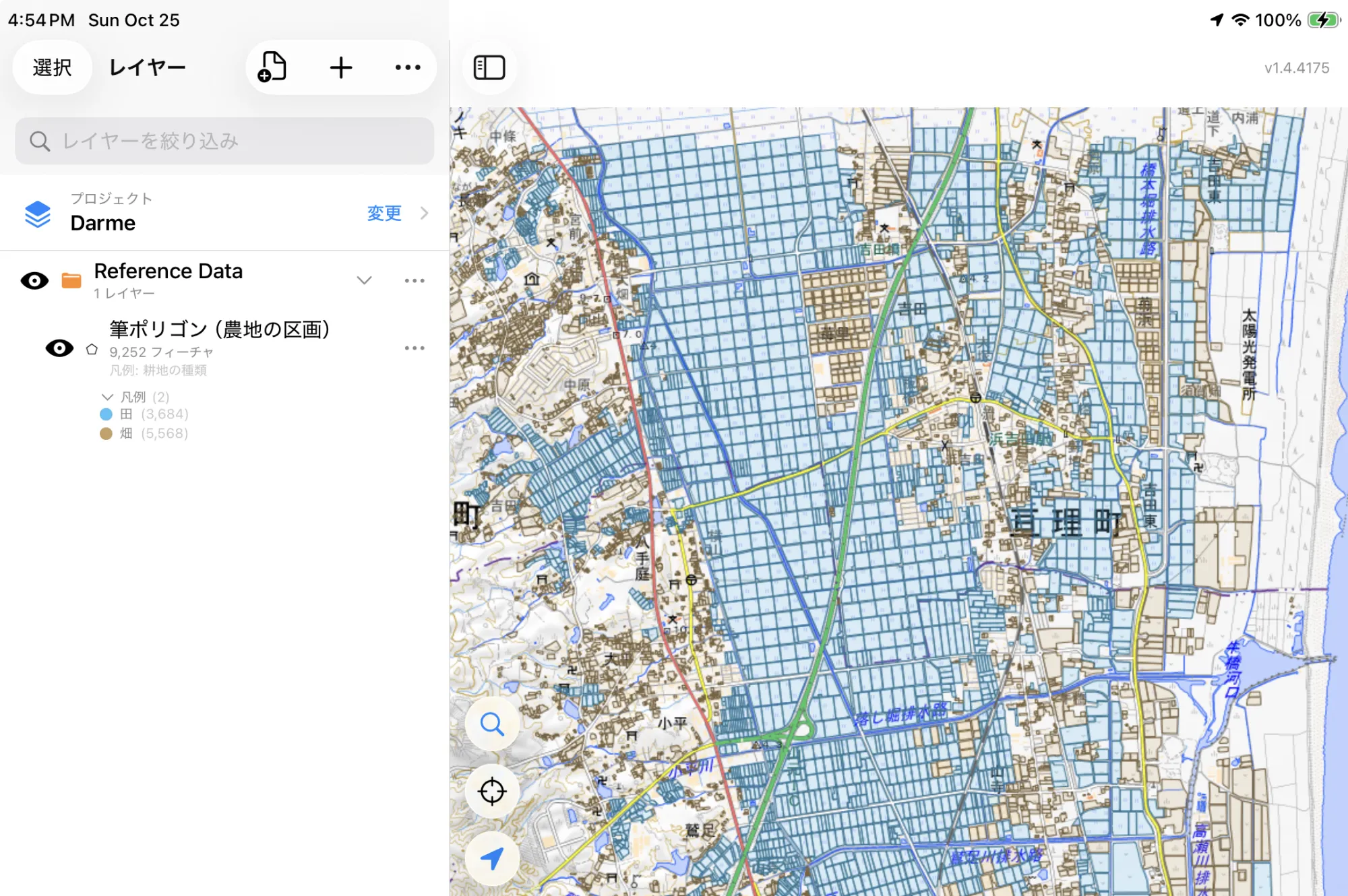
GoGIS now has a Japan section in Reference Data. Move the map to your area, pick Japan Farm Fields, and the field outlines download as a layer on your iPhone or iPad, colored paddy or upland, with each field's area worked out for you.
What's in Each Field
- Japan Farm Fields (Fude Polygons) — one polygon per field, with:
- Land Type: Paddy field (田), land farmed under water, mostly for rice; or Upland field (畑), farmed dry, which in MAFF's statistics includes ordinary fields, orchards and pasture.
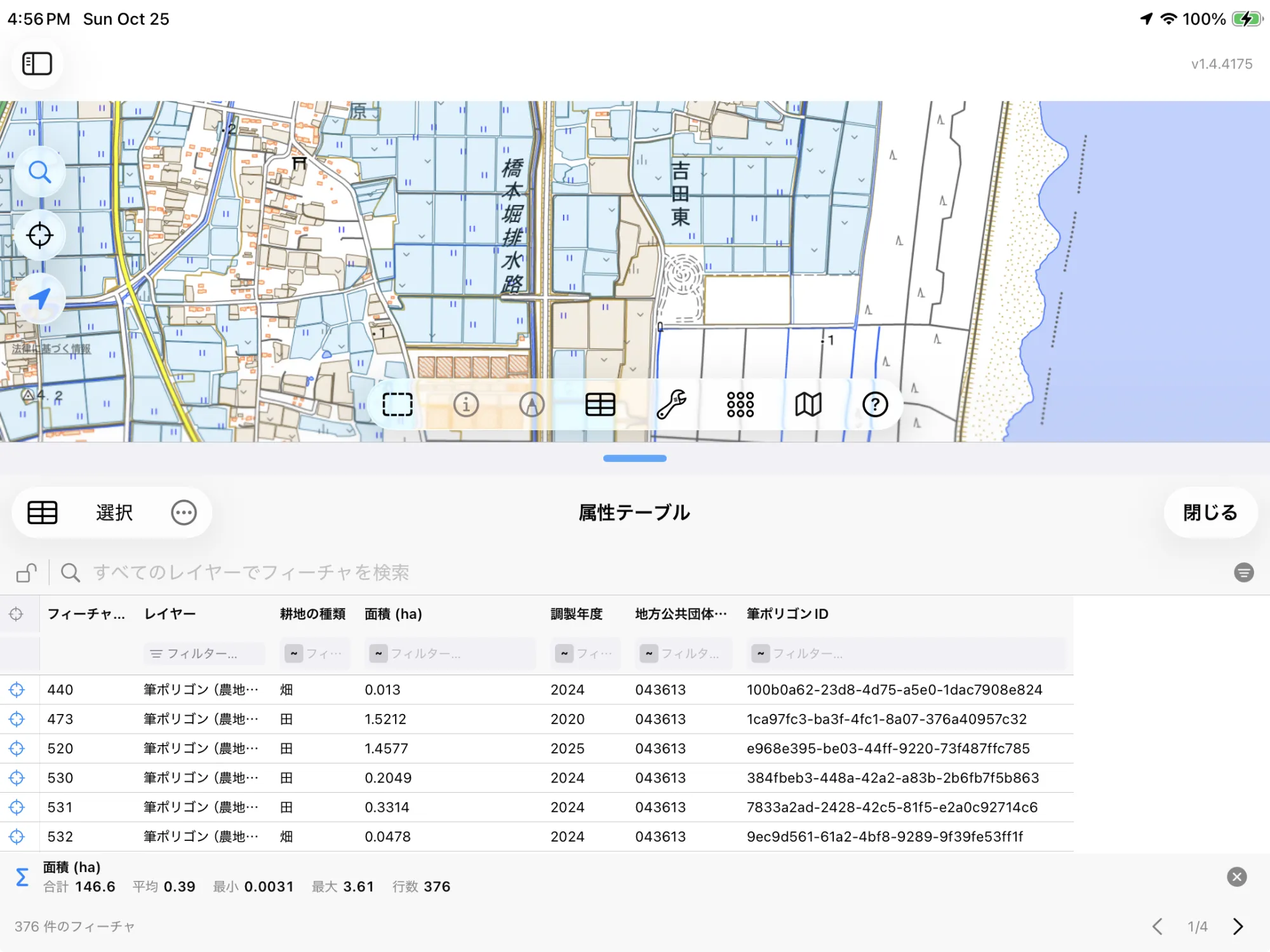
- Area (ha): the field's area in hectares, measured from its outline.
- Year Prepared: the year MAFF prepared the field's outline.
- Municipality Code: the national code of the city, town or village the field is in.
- Field ID: MAFF's identifier for the polygon.
| Land type | In Japanese |
|---|---|
| Paddy field | 田 |
| Upland field | 畑 |
In English or in Japanese
This is Japanese data, so GoGIS speaks Japanese when you do. With the app set to Japanese, the columns are MAFF's own names (耕地の種類, 面積 (ha), 調製年度, 地方公共団体コード, 筆ポリゴンID) and the fields are 田 and 畑. In any other language you get English throughout: Land Type, Area (ha), Year Prepared, Municipality Code, Field ID, and Paddy field and Upland field.
The legend changes with them, so a printed map or an exported shapefile reads in one language from end to end.
How to Download the Fields
- Move the map to your area. Search for a town or an address, or pan and zoom to the fields you want. GoGIS downloads what's on the screen.
- Open Reference Data. Tap Import, then Reference Data. The row of countries along the top opens on the one the map is showing, so with the map in Japan, the Japan datasets are the ones listed.
- Choose Japan Farm Fields. Fields are small and close together, so zoom in to a district or a few villages first. The download keeps going if you switch apps, the screen stays on, and progress shows on the map. If the area holds a great many fields, GoGIS tells you how many and asks before it downloads them.
- Read the map. The layer arrives colored by land type. Tap any field for its area and details, or change the legend to color by any other column.
Put the Fields to Work
- Measure fields at a glance. Every field carries its area, so you can sort the attribute table to find the largest, or add up a group of fields.
- Lay them over Japan's own maps. GoGIS has the Geospatial Information Authority of Japan's maps built in as basemaps: GSI Standard, GSI Pale and GSI Photo aerial imagery. The field outlines line up with the drains, roads and place names on them, and you can save an area for offline use before you head out.
- Find a field on the ground. With the layer downloaded, the outlines and your GPS position work with no signal, out among the paddies.
- Combine them with your own data. Open your sampling points, drone imagery or farm records over the outlines, or use Intersect to cut them by your own boundaries.
- Export or print. Share the layer as a Shapefile, GeoPackage, KML, GeoJSON or CSV, or print a PDF map. MAFF's source credit goes on the print and with the export, as its terms of use ask.
Elsewhere in the world? Reference Data also has France's cadastre and crop parcels, Canadian soil maps, US soils and flood maps, and OpenStreetMap roads, rivers, buildings and land use anywhere.
Questions
Are these legal parcel boundaries?
No. Fude polygons are traced from imagery, not surveyed, and they follow each field as it looks from above rather than the registered land parcel. A field can span several registered parcels, or one parcel can hold several fields. Use them to see and measure farmland, not to settle a boundary.
Which year do I get?
The newest. MAFF publishes each year's fields as a new service, and GoGIS looks up the latest one every time you download. The Year Prepared column shows the year each field's outline was prepared.
How is the area worked out?
From the field's outline, corrected for the map projection, and given to a ten-thousandth of a hectare (one square meter). It's the area of the outline as traced, so it won't always match a registered area.
Do I need desktop GIS software or an account?
No. GoGIS downloads the fields straight from MAFF's published service. There's no key, no account and nothing to unzip.
Japan's farm fields, in your pocket
Every field outline, paddy or upland, in English or Japanese, ready to download on your iPhone or iPad.
Get GoGIS on the App Store